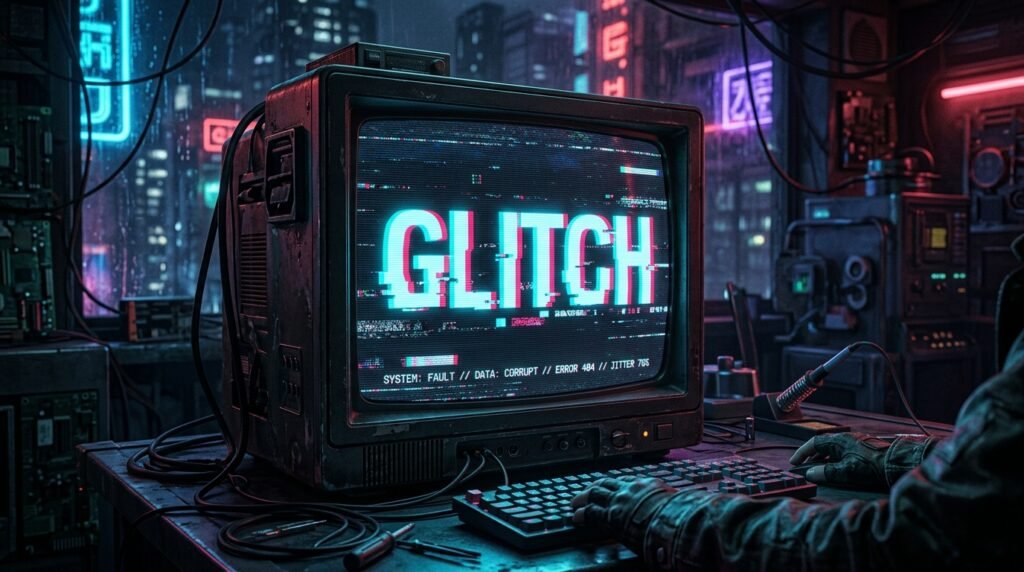
The Animated Glitch Text Generator is an advanced browser-based design suite that transforms boring typography into high-voltage digital distortions. Whether you need a dynamic title card for YouTube Shorts, a cyber banner for Discord, or an eye-catching stream asset for Twitch, this free online tool renders pure motion aesthetics instantly. If you are also looking for classic diacritic characters to copy and paste, make sure to explore our main Glitch Text Generator tool on the homepage.
Forget standard Unicode letters that remain completely frozen on your screen. With our motion graphics suite, you can customize chromatic RGB split coordinates, VHS magnetic noise flutter, and horizontal cathode scanlines with zero editing experience required.

Why Choose Our Animated Glitch Text Generator?
Standard font converters across the internet only provide static Zalgo text. While Zalgo symbols alter the look of typography, they cannot physically move, strobe, or animate across a video timeline.
Our online application eliminates this limitation by utilizing direct HTML5 frame buffers to render moving visual anomalies:
- Zero Software Installations: Generate animated graphics right in Chrome, Edge, Safari, or Firefox without downloading heavy applications like After Effects, Photoshop, or external CapCut plugins.
- Transparent Alpha Channel: Export visuals with a fully transparent background, making them ready to drop right over gameplay footage or live video in Premiere Pro, DaVinci Resolve, and OBS Studio.
- Real-Time Physics Tuning: Adjust RGB displacement values, temporal jitter, frame-per-second intervals, and font scales with instantaneous canvas feedback.
- Universal Device Support: Works smoothly across mobile phones, tablets, and desktop computers without sacrificing performance.
- 100% Royalty-Free: Downloaded graphics belong entirely to you with no watermarks, no subscription paywalls, and no account registrations required.
How to Create Animated Glitch Text GIFs in 4 Simple Steps
Designing corrupted digital typography requires no prior technical background or motion design experience. Follow this streamlined walkthrough to craft your first animation:
Step 1: Input Your Custom Phrase
Type your gaming handle, community clan name, alert prompt, or brand tagline into the text input console at the top of the generator.
Step 2: Set Glitch and Dispersion Intensity
Use the RGB Split Intensity slider to determine how far the cyan and magenta color channels push away from the core text. Subtle shifts yield an analog CRT look, while maximum values simulate severe data packet corruption.
Step 3: Configure Scanlines and Framerate
Adjust your playback rate from a slow, eerie VHS crawl (4 to 8 FPS) up to an intense cyber strobe (20 to 30 FPS). Enable CRT scanlines to overlay horizontal retro lines across the canvas for authentic television texture.
Step 4: Download Your Snapshot or Video Loop
Click Download Snapshot (.PNG) to save a sharp still image, or click Export Animated Video (.WebM) to capture a clean multi-frame animation loop ready for instant distribution across your media projects.
Static Unicode Zalgo vs. Animated Glitch Text Generator
Choosing the correct visual format is essential for maintaining aesthetic consistency across social media channels and video editing software. While you can create eerie stacked symbols with our Zalgo Text Generator, dynamic moving graphics require canvas rendering:
| Dimension / Feature | Static Zalgo Typography | Animated Glitch Text Generator |
|---|---|---|
| Render Method | Unicode Combining Diacritical Marks | Hardware-Accelerated HTML5 Canvas |
| Motion Capacity | 100% Static (No Motion) | Dynamic Real-Time Flickering Loops |
| Color Spectrum | Single-tone (System default font color) | Multi-tone Cyan, Magenta, & White Separation |
| Export Formats | Plain Text String to Clipboard | Transparent PNG & High-FPS WebM Video Loop |
| Game Filter Safety | Often filtered as ### on Roblox / Steam |
100% immune (delivered as visual media) |
| Video Editing Ready | Requires manual text formatting layers | Drag-and-drop video timeline ready |
How Chromatic Aberration and Digital Noise Work
Visual glitch culture draws inspiration from hardware transmission failures, damaged electromagnetic tape heads, and optics issues. When generating visuals with the Animated Glitch Text Generator, you are actively controlling three distinct mechanical anomalies:
1. Chromatic Aberration (RGB Color Splitting)
In physical photography and analog screen displays, chromatic aberration occurs when lenses or electron beams fail to focus all primary colors onto the exact same convergence point. By shifting pure Cyan (#00FFEE) and Magenta (#FF0055) light spectra away from the core white text, our generator reproduces this authentic optical dispersion. For deeper technical insights into optical refraction, review the principles of Chromatic Aberration on Wikipedia.
2. CRT Horizontal Scanlines
Before high-resolution OLED panels existed, cathode-ray tube televisions generated moving frames by sweeping an electron beam across horizontal phosphor rows. Adding interlaced scanlines gives typography an authentic retro-tech aesthetic reminiscent of vintage cyberpunk computer terminals.
3. Spatial Slice Jitter
When compressed video signals experience frame packet drop, entire blocks of pixel rows slide horizontally along the X-axis while freezing across the Y-axis. The tool’s integrated noise engine randomly crops and offsets horizontal canvas ribbons to mimic genuine hardware signal decay.
(Looking for a complete catalog of text distortion styles? Browse our full collection of glitch text creation tools to find the ideal aesthetic for your project).
Top Places to Deploy Your Glitch Text Animations
Looped visual distortions capture viewer attention far faster than standard flat typefaces. Here is where content creators achieve the highest engagement with their generated media:
Twitch and Kick Live Stream Overlays
Set up reactive alerts for incoming raids, new subscribers, and bits donations. A flickering terminal alert builds instant suspense during competitive esports streams like Valorant, Apex Legends, and Cyberpunk 2077.
Discord Banners and Animated Profile Icons
Discord Nitro members can personalize their user profile with animated WebM and GIF assets. Uploading a custom glitch title gives your profile or server header a distinctive tech-hacker aura that immediately stands out in text channels.
Video Editing Timelines (CapCut, Premiere, DaVinci)
Instead of building tedious frame-by-frame mask tracks inside complex desktop software, export your transparent glitch graphic directly from this page. Place it on the video track above your clips and set the blend mode to Screen or Linear Dodge for an effortless title card.
TikTok, Reels, and YouTube Shorts Hooks
The first 2 seconds of short-form video determine whether a viewer swipes or watches. Corrupted motion titles act as powerful visual pattern interrupts, keeping retention graphs elevated through the introduction of your video.
Frequently Asked Questions (FAQ)
What is an Animated Glitch Text Generator?
An Animated Glitch Text Generator is an online digital utility designed to transform standard text into animated graphics featuring RGB chromatic aberration, VHS noise shakes, CRT scanline filters, and continuous frame flickers.
Can I download transparent glitch text animations?
Yes. By checking the Transparent Background option in the studio controls, the solid dark background disappears, outputting a clear alpha channel that can be overlaid directly over gaming clips and video layers without dark outlines.
Is this glitch animation maker free for commercial use?
Yes. All still snapshots and video loops created with the Animated Glitch Text Generator are 100% royalty-free. You are fully licensed to use your generated files in commercial client projects, monetized YouTube videos, video games, stream overlays, and promotional marketing materials.
Does the generator upload my text to an online server?
No. All rendering calculations, jitter algorithms, and frame recordings are handled exclusively on your computer or smartphone via client-side JavaScript. None of your entered phrases or handles are stored or transmitted anywhere, ensuring complete data privacy.
Create Your Custom Motion Glitch Graphic Today
Upgrade your digital typography today. Scroll up to the Animated Glitch Text Generator console above, type your message, configure your preferred RGB distortion, and download your animation in seconds!